> ## Documentation Index
> Fetch the complete documentation index at: https://developers.super.work/llms.txt
> Use this file to discover all available pages before exploring further.
# Get started
> Welcome to the Super API guide
 ## Grab your API key
Every call to our public API has to be authenticated with a personal API key, generated in your settings.
* Open the menu of your organization, located at the top left of the app
* Click on `Settings` then `API` tab
* You can now generate a new key
## Grab your API key
Every call to our public API has to be authenticated with a personal API key, generated in your settings.
* Open the menu of your organization, located at the top left of the app
* Click on `Settings` then `API` tab
* You can now generate a new key
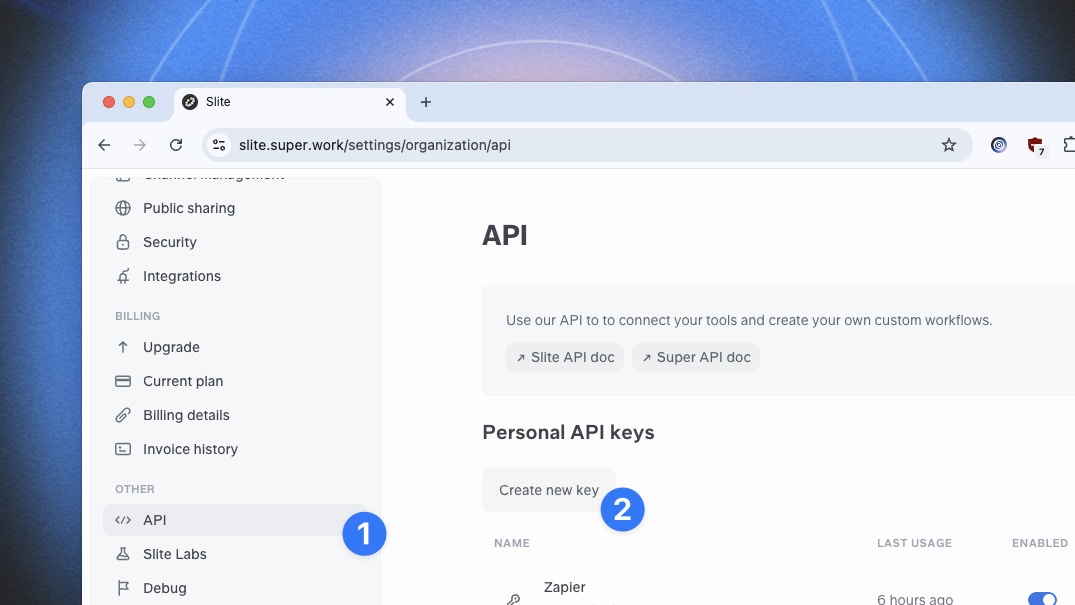 Each API key is personal and authorizes access to all the user content.
## Make your first request
See our endpoints and use the playground to test your first requests:
Ask a question to Super
Add custom content to your Super knowledge base
View all your indexed custom content
Remove content from your Super knowledge base
Generate and send a digest of your content
Each API key is personal and authorizes access to all the user content.
## Make your first request
See our endpoints and use the playground to test your first requests:
Ask a question to Super
Add custom content to your Super knowledge base
View all your indexed custom content
Remove content from your Super knowledge base
Generate and send a digest of your content